
🔧 Easy Guide: How to Access the EasyStart Pro Workshop Menu
If you're setting up or servicing an Eberspacher heater with an EasyStart Pro controller, the Workshop Menu is your go-to for advanced settings and diagnostics. Here's how to access it in just a few simple steps.
🚪 Step 1: Go to the Settings Menu
- Turn the operating button until you see the gear icon (⚙️).
- Press the button to enter the Settings menu.
⏱️ Step 2: Unlock the Workshop Menu
- Look for the clock symbol flashing under the gear icon.
- While it’s flashing, press and hold the BACK button for more than 2 seconds.
- This opens the Workshop Menu, giving you access to technician-level tools.
🧰 What You Can Do in the Workshop Menu
Once inside by turning the knob on the front of the controller, you’ll find options to:
- ✅ Change system settings (language, display brightness/contrast)
- 🔄 Reset to factory defaults
- 🔍 View device info (software/hardware versions)
- 🛠️ Set and reset maintenance intervals
- ⚠️ Read and clear fault codes
- 🔁 Switch between heater groups and identify connected units
📝 Tips to Keep in Mind
- If something goes wrong during setup, you can reset the system by removing the fuses located in the heater wiring harness (usually near the battery).
- When connected to an Eberspacher Water heater using departure time mode, make sure to enter your engine size (displacement) and heater run time correctly.
- For systems with multiple heaters (Airtronic 2/3 or Hydronic S3), use the group identification feature to manage them easily.
Ref: Eberspacher EasyStart Pro Controller Technical Documents
Product: Eberspacher EasyStart Pro Controller
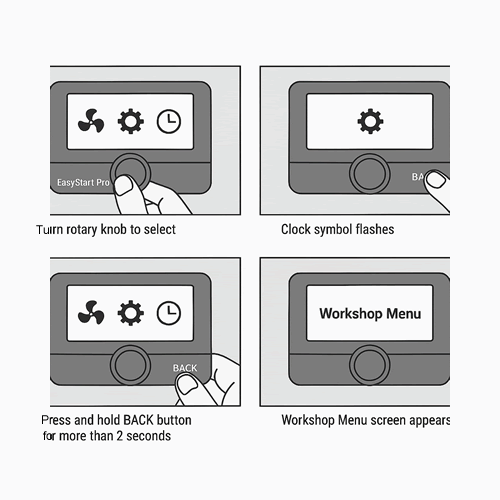
Step by Step Instructions
